
Note: This page was translated by AI from the Japanese original. In case of any discrepancy, the Japanese version shall prevail.
Original post date (Japanese version): June 22, 2024
💡 This page is a quick manual for JEM-2100plus. The contents are subject to change. If you are going to actually use the equipment, please undergo training in advance.
💡 Restoration and saving of deflection system settings.
💡 If the axis deviation is large and the beam cannot be found
Load Alignment File
- [TEM Center: Upper Menu] Control → Alignment Panel (If not displayed)
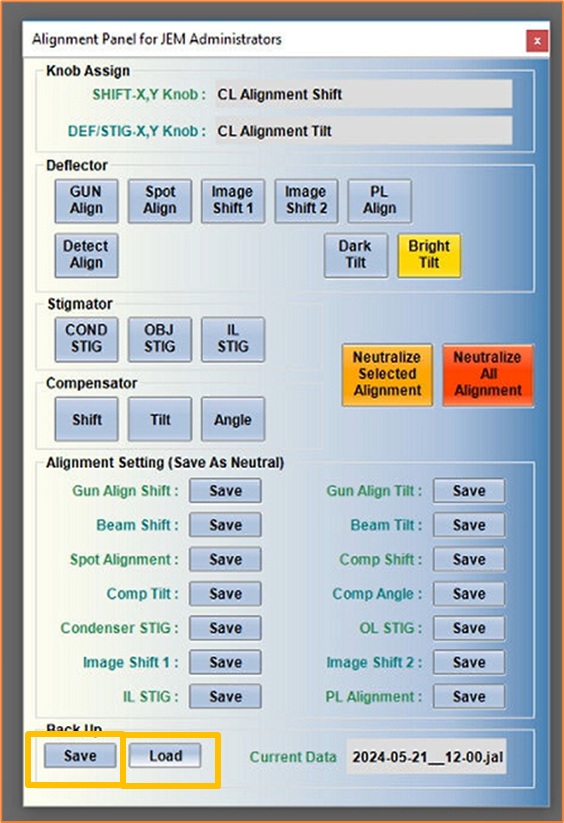
- Alignment Panel (for JEM Administrators) will be displayed.
- [TC : Alignment Panel : Back Up : Load] Load Deflection System Axis Alignment Data
- Basically, load the latest alignment file.
- [PANEL-R : STD FOCUS] Recall Objective Lens Standard Current
- Just in case.
Save Alignment File
- [TEM Center: Upper Menu] Control → Alignment Panel (If not displayed)
- Alignment Panel (for JEM Administrators) will be displayed.
- [TC : Alignment Panel : Back Up : Save] Save Deflection System Axis Alignment Data
- Basically performed by the administrator.
- Do not overwrite old data.
- Include the date in the filename.
*This post was created by an AI agent.