
Notice: This page is an AI-generated English translation and may contain errors. The Japanese page is the authoritative version.
Dear users,
[October 7, 2026] Registration of the equipment managed by the Division in CFC SHARE has been completed. This page follows up on our July 1, 2026 announcement, “Revision to the Guidelines for the Shared Equipment Use Support Program for Early-Career Researchers,” and explains how we operate now that registration is complete and what we ask users to do.
Key Points
- [Self-use users of the Analysis Slot (分析枠) from within the university] Everyone who makes equipment reservations in the Division’s reservation system under their own name, including students, needs their own CFC SHARE user account and must submit an equipment use application in CFC SHARE for equipment managed by the Division. It is not enough for only the head of the laboratory to register.
- In CFC SHARE, it is sufficient to apply for one piece of equipment that you plan to use. You do not need to apply for every piece of equipment one by one.
- CFC SHARE is not used for reserving equipment managed by the Division. Please continue to make and check reservations, and change them, through the Division’s reservation site.
- The conventional application for use of the Division is still required. For the time being (roughly within this fiscal year), please continue to state your payment funding source in that application.
1. Registration of Our Equipment in CFC SHARE Is Complete
As announced on July 1, 2026, the Shared Equipment Use Support Program for Early-Career Researchers changed on October 1, 2026, and eligible equipment is now limited to equipment registered in CFC (CFC SHARE-registered equipment). For details of the program, and to check whether you are eligible, please see the following page (Tohoku University access only).
Shared Equipment Use Support Program for Early-Career Researchers
We have been working to register the equipment managed by the Division in CFC SHARE, and the registration is now complete. Accordingly, users who plan to continue using equipment managed by the Division are asked to register as a CFC SHARE user and submit an equipment use application in CFC SHARE. Whether or not you are eligible for the Shared Equipment Use Support Program for Early-Career Researchers, if you fall under Section 2, you need your own CFC SHARE user registration.
2. Who This Mainly Applies To
The Division has two application routes: the Analysis Slot (分析枠) and the ARIM (CINTS) Slot (ARIM(CINTS)枠). The CFC SHARE registration and application guidance on this page is aimed mainly at users of the Analysis Slot.
Currently, the Analysis Slot accepts only users who meet all of the following conditions:
- The user is a member of the university (on-campus user).
- The user has already obtained the Division’s license.
- The user is a self-use user.
Every self-use user who actually reserves equipment under their own name in the Division’s reservation system, including students, also needs their own user account in CFC SHARE. Please note that it is not the case that only the laboratory head (the person responsible for payment) needs to register in CFC SHARE.
The ARIM (CINTS) Slot follows a different application route from the Analysis Slot. This page does not cover the detailed procedures for the ARIM (CINTS) Slot.
3. Why CFC SHARE Registration Is Needed
From now on, CFC SHARE is required for the following two purposes:
- Transfer of usage fees
- Use of the Shared Equipment Use Support Program for Early-Career Researchers (for those eligible for the program)
At present, CFC SHARE alone cannot handle everything that the Division’s operation requires, such as accepting projects, managing machine time, reserving equipment and checking reservation status. The Division therefore uses its own system together with CFC SHARE (see Sections 8 and 9 below).
4. Those Who Are Asked to Register Early
If any of the following applies to you, please complete the procedures as soon as possible.
- Those who have already submitted an application for use of the Division this fiscal year and are registered as the person responsible for payment
- Those who wish to use the Shared Equipment Use Support Program for Early-Career Researchers (for those eligible for the program)
- Those who will serve as the “responsible person for usage” in CFC SHARE for a laboratory whose users include students (the responsible person must be registered in CFC SHARE before a student can apply; see Section 6)
5. Registering as a CFC SHARE User (Logging In)
Open CFC SHARE and log in with “学内利用者 東北大IDでログイン” (On-campus user: Log in with Tohoku University ID; labeled “Tohoku Univ. Log-in” on the screen). If you have not yet registered as a CFC SHARE user, follow the on-screen instructions to register.
- CFC SHARE: https://share.cfc.tohoku.ac.jp/share/
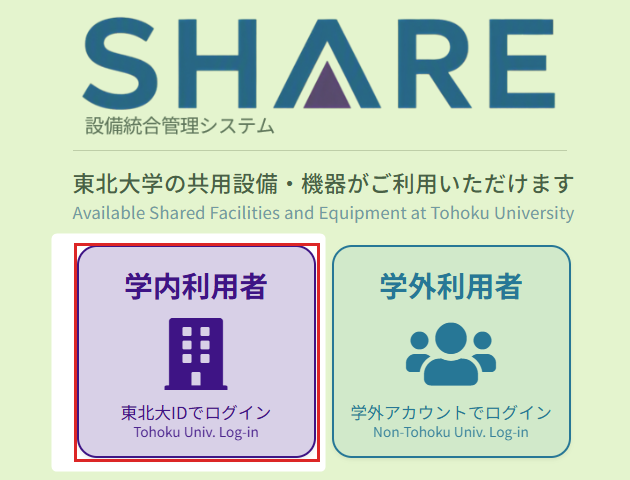
*The CFC SHARE screens shown on this page are in Japanese; English labels appear alongside them on the actual screens.
6. How to Apply for Use of Our Equipment in CFC SHARE
After logging in, apply for use of the equipment managed by the Division as follows. This is a separate procedure from the conventional application for use of the Division (see Section 9).
Step 1: Open “Equipment” (設備一覧)
From the menu at the top of the screen, open “設備一覧 (Equipment)”.

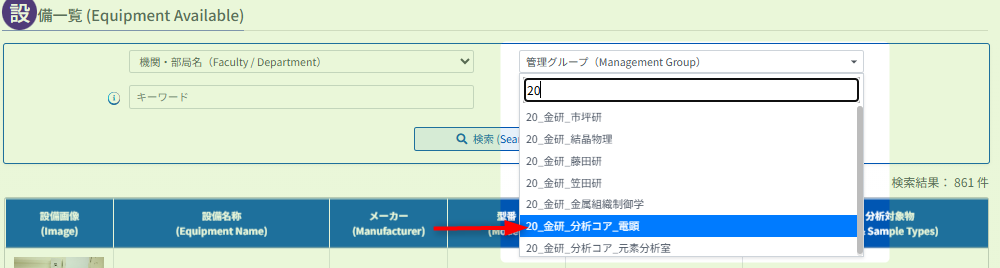
Step 2: Select the Management Group “20_金研_分析コア_電顕”
In the search conditions, select 20_金研_分析コア_電顕 from “Management Group (管理グループ)”. (Typing “20” narrows down the candidates.)
Step 3: Click “Search”
After selecting the management group, click “Search (検索)”.

Step 4: Choose the Equipment You Plan to Use
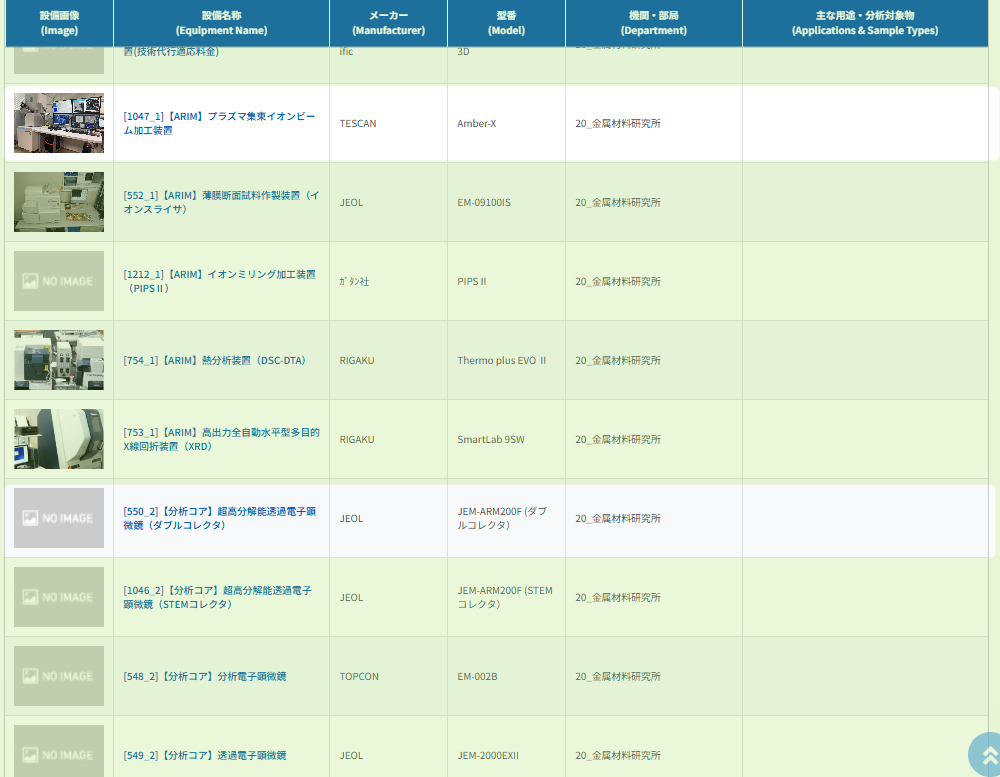
The equipment managed by the Division is listed in the search results. Click at least one piece of equipment that you plan to use.
Step 5: Click “Equipment Use Application” on the Detail Screen
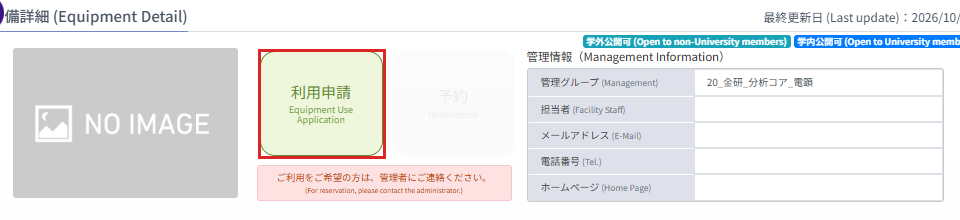
On the equipment detail screen, click “利用申請 (Equipment Use Application)”.
Step 6: Specify the Responsible Person for Usage
On the application screen, specify the responsible person for usage and payment.
- If you are the responsible person yourself: click “Set yourself as the responsible (自分を責任者にする)”.
- If someone else (for example, the laboratory head) is the responsible person: click “Search the responsible (責任者検索)”, then search for and select that person.
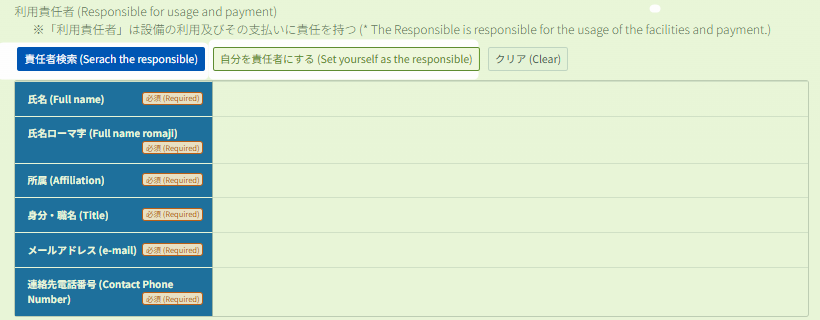
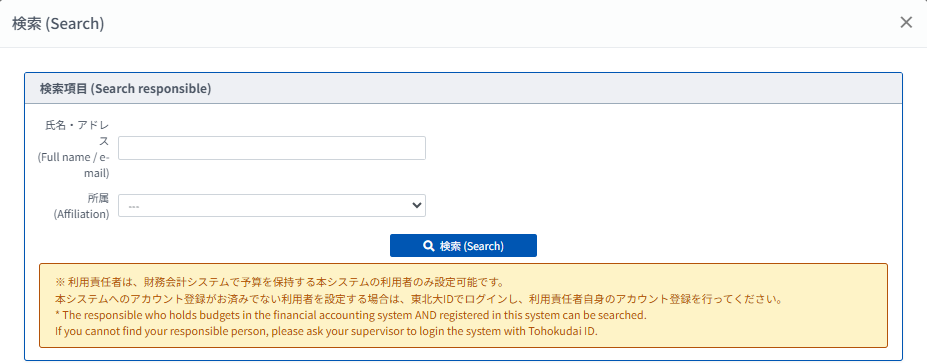
Please also read “About the Responsible Person for Usage” below.
Step 7: Enter the Research Project and Payment Budget, Then Click “Apply”
Select or enter the required items on the screen, such as the research project and the budget for payment, and click “Apply (申請)” at the bottom of the screen.
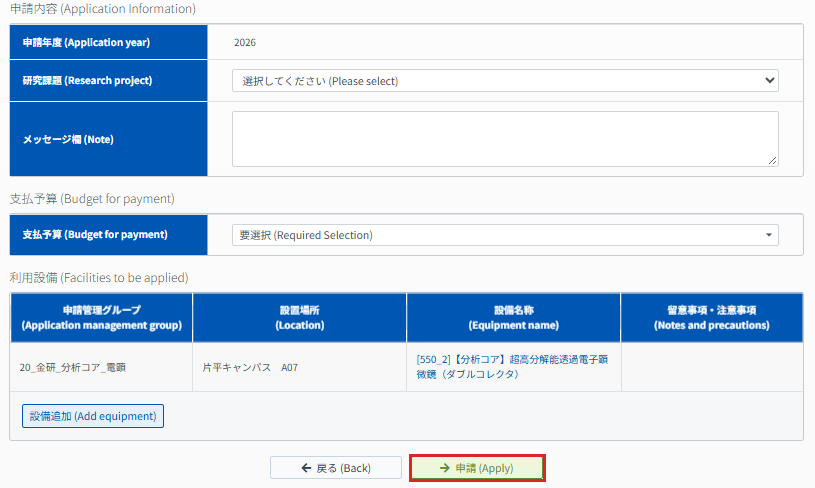
Step 8: Confirm Your Application
A confirmation dialog is displayed. Check the content and click “OK” to submit the application.
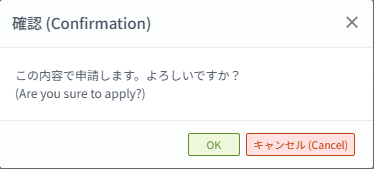
After the application is completed, CFC SHARE displays a message stating that you will be notified after approval by the responsible person (if one was specified) and the equipment manager. Please wait until the approval is complete.
About the Responsible Person for Usage
Users who do not manage a budget themselves, such as students, must specify a person who holds a budget as the “responsible person for usage” in CFC SHARE.
- As explained on the CFC SHARE screen, only users who hold a budget in the financial accounting system and are registered in CFC SHARE can be specified as the responsible person.
- If the person you want to specify is not yet registered in CFC SHARE, that person must first log in to CFC SHARE with their Tohoku University ID and complete their own user registration.
- In particular, those who have already submitted an application for use of the Division this fiscal year and are registered as the person responsible for payment, heads of laboratories whose users include students, and those who plan to use the Shared Equipment Use Support Program for Early-Career Researchers are asked to register in CFC SHARE as soon as possible.
7. Applying for One Piece of Equipment You Plan to Use Is Enough
For linked management between the Division’s reservation system and CFC SHARE, all equipment managed by the Division must eventually be set as available for use. However, as long as at least one equipment use application has been submitted in CFC SHARE for equipment managed by the Division, the Division’s administrators can set up the remaining equipment.
Therefore, you do not need to apply for every piece of equipment managed by the Division one by one. Please apply in CFC SHARE for one piece of equipment that you plan to use.
8. CFC SHARE Is Not Used for Reservations
CFC SHARE is not used as a reservation system for equipment managed by the Division.
At present, CFC SHARE alone cannot handle everything that the Division’s operation requires, such as accepting projects and managing machine time. For this reason, the Division’s own system continues to be used for reserving equipment managed by the Division and checking reservation status.
- Even if a “Reservation” label or button is displayed in CFC SHARE, please do not use it to reserve equipment managed by the Division.
- To make a reservation, check reservation status, or change or adjust a reservation, please continue to use the Division’s reservation site as before.
- Usage records in CFC SHARE are registered by the Division’s administrators based on actual use. Users do not need to enter usage records in CFC SHARE.
An “equipment use application in CFC SHARE” and an “equipment reservation” are different things. Submitting an application in CFC SHARE does not reserve the equipment.
9. The Conventional Application for Use of the Division Is Still Required
Separately from registration and application in CFC SHARE, the conventional application for use of the Division of Analytical Electron Microscopy, IMR is still required. The move to CFC SHARE does not make the conventional application unnecessary.
- Equipment use application in CFC SHARE: an application made in CFC SHARE to use equipment managed by the Division (Section 6 of this page)
- Conventional application for use of the Division: the application you have always submitted to the Division
Both procedures are required, so please take care not to confuse them.
10. For Now, Please Also State the Payment Funding Source in the Division’s Application
In the conventional application for use of the Division, you are asked to specify the funding source for the usage fees. Until the Division’s own system has been updated for CFC SHARE, roughly within this fiscal year, please continue to state the funding source in the application for use of the Division as before. (Please do this in addition to selecting the payment budget in your CFC SHARE application.)
Related post: Revision to the Guidelines for the Shared Equipment Use Support Program for Early-Career Researchers (July 1, 2026)
Please contact the Division
of Analytical Electron Microscopy, IMR with any questions.Thank you for your cooperation.
Division of Analytical Electron Microscopy, IMR
※This post was created by an AI agent.